What Router Bit Chatter Actually Is and Why It Happens
Router bit chatter has gotten complicated with all the misconceptions flying around—it sounds catastrophic but usually isn’t. I spent three years blaming my router for chatter before I realized the tool itself was fine. The issue was harmonic vibration caused by something upstream in my setup.
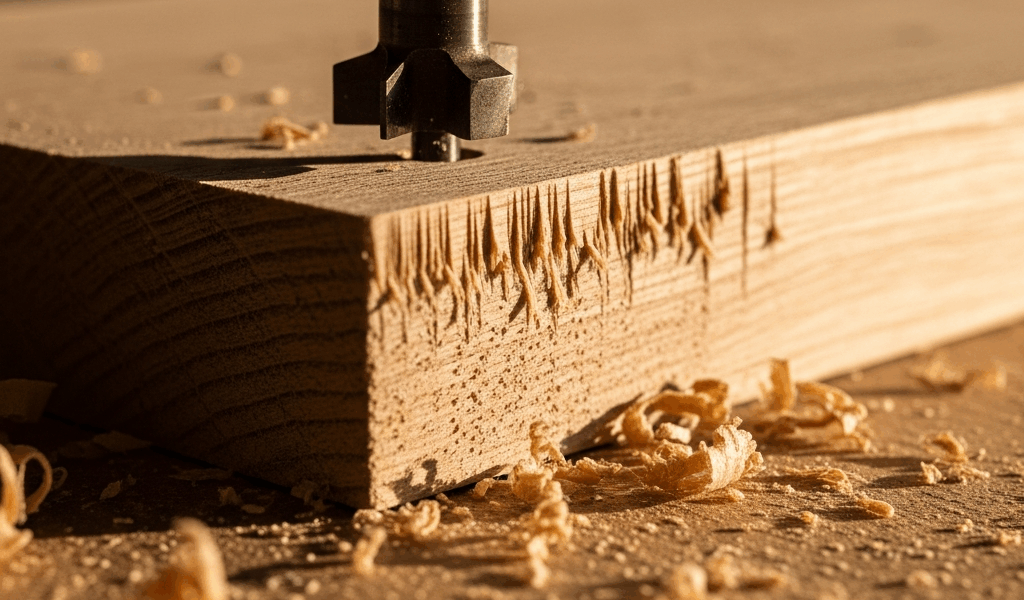
Here’s what needs to be clear from the start: chatter isn’t runout. Runout is physical wobble where the bit literally isn’t centered. Chatter? That’s your bit vibrating at a frequency that causes it to skip across the wood surface instead of cutting cleanly. You’ll hear it immediately — a stuttering, almost chattering sound (hence the name) that leaves visible ripples or scallops in your cut.
The vibration starts when something in your system is fighting against the cutting action. A dull bit requires more force to cut, so the router works harder. A worn collet doesn’t grip tightly, allowing the bit to move fractionally. Low spindle speed on a small bit means the cutting edge hits the wood at the wrong angle. Too-fast feed rate overloads the bit. Any of these alone can trigger chatter. Combined? They’re guaranteed to.
Taking too thick a pass on a 1/4-inch bit at 12,000 RPM in hard maple — that’s chatter waiting to happen. The bit deflects under load, misses its intended path, then snaps back. The wood surface catches the next tooth, and you get that horrible vibration.
Check Your Collet and Bit Seating First
Probably should have opened with this section, honestly. Most people skip the collet entirely and jump straight to speed and feed adjustments. That’s backwards.
Your collet is the squeeze mechanism that holds the bit. Over time — usually after 200 to 300 hours of use — collets wear. The internal taper develops micro-scratches. The grip weakens. A loose bit in a worn collet will vibrate even if everything else is perfect.
Here’s the inspection sequence I use:
- Power off the router completely. Unplug it.
- Remove the collet and bit shank. Look inside the collet opening with a flashlight. You’re looking for visible wear marks, scratches, or discoloration on the internal taper. A used collet should look relatively smooth and uniform in color.
- Feel inside with a clean fingertip. If you feel rough spots or ridges, the collet is done. Replace it.
- Clean the collet and bit shank with a dry cloth. Dust and debris inside the collet create gaps. Even a tiny amount of wood dust prevents proper seating.
- Insert the bit. This matters — you want the shank inserted about 1/2 inch into the collet on a standard 1/4-inch collet. Too shallow and it won’t grip. Too deep and you risk bottoming out and damaging the shank.
- Tighten the collet nut with the wrench. Hand-tight is not tight enough. Use steady, deliberate pressure. You’ll feel resistance when the collet grips properly. Stop there.
The tightening sequence is critical. Many routers have a wrench flat on the shaft. Use it. Hold the shaft with one wrench while you tighten the collet nut with another. This prevents shaft rotation and ensures even clamping pressure around the collet.
Don’t over-tighten. I’ve seen people crank the collet nut until it won’t turn anymore, and that deforms the collet and damages the tapered bore. You’re looking for firm, controlled resistance — usually between a quarter and half turn past hand-tight, depending on the router model.
If you replace the collet, buy the OEM version for your router model. A Bosch 1/4-inch collet won’t work the same way in a DeWalt. The taper angle varies slightly.
Match Spindle Speed to Bit Diameter and Material
This is where most generic router advice falls apart. People say “just reduce your speed” without understanding why speed matters or what the actual target should be. That’s frustrating advice.
Small bits need high RPM. Large bits need low RPM. The relationship is inverse and non-negotiable.
A 1/4-inch bit in softwood should run between 18,000 and 24,000 RPM — at least if you want clean cuts. In hardwood, drop it to 12,000 to 18,000 RPM. In plastic or composites, you can push it back up to 20,000 RPM or beyond because the material cuts more easily.
A 1-inch bit in hardwood? 6,000 to 8,000 RPM maximum. Run that same bit at 20,000 RPM and you’re looking at 20,000 surface feet per minute. The teeth can’t cut cleanly at that speed. The bit also overheats.
A 2-inch panel bit running at 30,000 RPM is asking for disaster. You’ll get chatter, burning, and rapid dulling. That same bit at 5,000 RPM cuts smoothly and lasts longer.
Check your router’s manual for the recommended speed chart. Most routers with variable speed have a dial or display showing RPM ranges for different bit sizes. Ignore the generic numbers on the packaging. Use the manual.
If your router doesn’t have variable speed, you’re stuck with a fixed spindle speed — usually 27,000 RPM. This means you can’t run large bits effectively. You’re locked into smaller diameters that work at high RPM. That’s a real limitation, and it’s worth knowing before you buy a router.
Feed Rate and Direction Matter More Than You Think
Feed rate is how fast you move the router (or the workpiece) through the cut. Too fast, and the bit can’t remove chips quickly enough. It chatters, gets bogged down, and forces you to push harder. Too slow? The dull edge of the previous tooth heat-hardens the wood, making the next tooth work even harder.
The sweet spot is when the router hums smoothly and chips eject easily. You’re not forcing it, and you’re not creeping along.
For a 1/4-inch bit in softwood at 18,000 RPM, I move at roughly 8 to 12 inches per minute. In hardwood with the same bit at 12,000 RPM, I slow to 4 to 8 inches per minute. These aren’t universal — they depend on bit sharpness, material hardness, and bit design.
The best diagnostic: listen to the router. A sharp bit at proper speed and feed sounds like a controlled hum. Add resistance, and the pitch drops. Reduce resistance, and it rises. Chatter sounds like stuttering. That’s your cue to adjust something.
Climb cutting — feeding the router opposite to the bit rotation — can cause chatter if your feed rate isn’t absolutely consistent. The bit wants to pull itself forward. Conventional cutting (feeding with the rotation) is more stable and forgiving. If you’re dealing with chatter, switch to conventional until you eliminate other variables.
Dust collection affects feed rate more than people realize. A clogged dust collection system forces you to slow down because the chips aren’t clearing. Slow feed rates combined with marginal speed often trigger chatter. Clean your dust port and collection bag regularly — a blocked system is an invisible feed rate killer.
Bit Quality and Deflection Under Load
Budget bits deflect more than quality bits. That’s physics. A softer steel core or cheaper carbide with looser tolerances will bend under cutting pressure. Deflection causes chatter.
That doesn’t mean you need to buy premium bits for everything. A $6 straight bit from a big-box store works fine for ripping dadoes in pine. That same bit in hard maple at thick depths? It’ll chatter and dull quickly. Don’t make my mistake.
Compression bits — cutting down on top and up on bottom simultaneously — are inherently more stable because they distribute cutting forces differently. They cost more ($18 to $30 compared to $6 to $10 for a standard straight bit), but if you’re edge-banding composite panels, the reduced chatter is worth it.
Spiral bits (either up-cut or down-cut) produce less chatter than straight bits at the same speed and feed because they handle chips more efficiently. The angled flutes clear debris continuously instead of all at once. If you’re struggling with chatter on straight bits, spirals often solve it without changing speed or feed.
I owned $5 straight bits and wondered why I got chatter in hardwood. Upgrading to better bits eliminated half my chatter problems. The other half was speed and feed. That’s apparently how it works.
Quick Diagnostic Checklist
When chatter happens, work through this sequence to isolate the cause:
Does it chatter in all materials — softwood, hardwood, plywood? Collet problem most likely. The bit isn’t seating properly, and material doesn’t matter. Check collet wear and bit insertion depth first.
Only in hardwood or dense materials? Speed and feed issue. Try reducing feed rate by half or lowering speed by 20%. If it stops, you found it. If it continues, inspect the bit for dullness.
Only at certain bit depths or with certain bit sizes? Bit deflection. Smaller depths and smaller bits should chatter less if deflection is the cause. Switch to a higher-quality bit or reduce the depth per pass.
Chatter that appears suddenly after months of smooth cutting? Collet wear or bit dulling. That’s what makes this diagnostic endearing to us — the collet has gradually loosened. Replace the collet and sharpen or replace the bit.
Work through the checklist methodically. Most chatter problems solve themselves once you identify whether it’s collet, speed, feed, or bit quality. So, without further ado, you’ve got this.


Stay in the loop
Get the latest the home woodshop updates delivered to your inbox.